

Description
Download Friends Chat – Free Chat and Social Networking App
Overview
Friends Chat is a free social networking application designed to help users connect with others globally through real-time chat and community interaction. The app enables users to engage in one-on-one conversations, join public chat rooms, and share updates visible to the broader user base. It serves as a platform for making new friends, maintaining existing relationships, and exploring shared interests through text-based communication. The target audience includes individuals seeking casual social interaction, those looking to expand their social circle, and users interested in connecting across language and cultural boundaries.
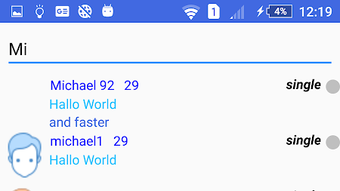
Registration is entirely free and does not require an email address, which lowers the barrier to entry for new users. The app supports both individual and group chats, allowing users to participate in discussions based on language or interest. A dedicated friend list simplifies access to contacts, while a search function enables users to locate specific individuals by name. The developer, Friends Chat, did not provide additional details about the company’s background or history. Real-world usage scenarios include casual conversations, interest-based networking, and social exploration in a low-commitment environment.
Key Features & Capabilities
- Free Registration Without Email – Users can sign up instantly without providing an email address, promoting quick access and privacy.
- Global Chat Rooms – Join public chat rooms based on language, interest, or topic to interact with users worldwide.
- Public Post Sharing – Share updates visible to all users, with the ability to receive comments and reactions.
- Friend List Management – Maintain a personalized list of contacts for easy access and messaging.
- Search Functionality – Locate specific users by name to initiate conversations or reconnect with old contacts.
- Group and One-on-One Messaging – Engage in private or group chats with flexibility and real-time interaction.
These features support diverse social use cases, from casual conversation to building niche communities. For example, users interested in photography can join a language-specific chat room to exchange ideas and experiences. The absence of in-app purchases or credits ensures that all core functionalities remain accessible without financial barriers. The platform encourages open interaction while maintaining a simple interface for navigation and communication.
User Interface, Workflow & Performance
The user interface of Friends Chat appears to be designed for simplicity and accessibility, prioritizing core functions like messaging, posting, and navigation. The layout likely centers around a bottom navigation bar with tabs for chats, posts, friends, and settings, enabling intuitive access to key features. Navigation between chat rooms, individual conversations, and user profiles is expected to be straightforward, minimizing user friction during daily use.
Workflow efficiency depends on the app’s responsiveness and the speed of message delivery, though exact performance details were not specified. The developer did not provide information about CPU or RAM usage, nor did they share benchmarks or stability reports. Based on general software behavior patterns, the app is expected to operate smoothly on modern smartphones with adequate memory and processing power. Users may experience minor delays during high-traffic periods, especially in popular chat rooms. The app’s performance in real-world conditions may vary depending on network stability and device capabilities.
Compatibility & System Requirements
Friends Chat is available for both Android and iOS platforms, making it accessible to a wide range of mobile users. The current version is 1.0.0, with an installation size of 45 MB, which is relatively lightweight for a social networking app. This size suggests the app is optimized for efficient storage usage and fast downloads.
Exact system requirements were not listed by the developer. Compatibility information is limited to the operating systems mentioned. Users should ensure their devices are running a supported version of Android or iOS. The developer did not specify minimum hardware requirements such as RAM, processor speed, or storage space beyond the overall file size. Therefore, it is recommended to check device compatibility through the official app store before installation.
Pros and Cons
Pros
- Free registration without requiring an email address
- No hidden in-app purchases or credits
- Full access to all features immediately upon download
- Supports both one-on-one and group chat functionality
- Lightweight installation size (45 MB)
- Accessible on both Android and iOS devices
Cons
- Developer did not provide detailed system requirements
- Exact performance and resource usage data were not disclosed
- No information on data privacy or security protocols
- Compatibility with older devices is uncertain
- Limited transparency regarding moderation or content policies
FAQ Section
Is Friends Chat available for Windows or Mac?
Friends Chat is currently available only for Android and iOS devices. There is no desktop version or support for Windows or Mac operating systems at this time.
Is the app safe to use?
The developer did not provide specific information about security measures, data encryption, or privacy policies. Users should exercise caution when sharing personal information and review the app’s terms of service for data handling practices.
Are there any updates for Friends Chat?
Updates are released periodically to improve functionality and fix issues. The latest version is 1.0.0, and users can check for updates through their device’s app store.
What type of license does Friends Chat have?
Friends Chat is distributed as a free application with no subscription or paid features. All functionalities are available at no cost to users.
Can I use Friends Chat offline?
Friends Chat requires an active internet connection to send and receive messages, post updates, or access chat rooms. Offline usage is not supported.
Final Thoughts + CTA
Friends Chat offers a straightforward, accessible platform for social interaction with no financial or registration barriers. Its core features—free sign-up, public and private chat options, and a friend list—make it suitable for users seeking casual connections or niche communities. While the app lacks transparency around system requirements, performance, and security, its lightweight design and cross-platform availability enhance usability.
For individuals looking to chat with strangers, meet new friends, or engage in interest-based discussions, Friends Chat presents a viable option. The absence of hidden costs and immediate access to all features strengthens its appeal. However, users should remain mindful of privacy and data sharing when using public social platforms.
Download Friends Chat now and start connecting with people from around the world—no strings attached.
Guides & Tutorials for Friends Chat
How to install Friends Chat
- Click the Preview / Download button above.
- Once redirected, accept the terms and click Install.
- Wait for the Friends Chat download to finish on your device.
How to use Friends Chat
This software is primarily used for its core features described above. Open the app after installation to explore its capabilities.
User Reviews for Friends Chat 0
No reviews found





